
How Much Does Railway Cost in 2026?
Railway offers Free at $0, Hobby at $5 per month, Pro at $20 per workspace per month, and custom Enterprise pricing. Free includes a small recurring credit. Hobby and Pro apply their subscription fees toward eligible usage instead of adding those fees to the full usage bill. Choose Pro for higher technical limits or collaboration features, not merely because Hobby usage exceeds $5.
| Railway plan | Monthly subscription | Included monthly usage | Suitable for |
|---|---|---|---|
| Free | $0 | $1 | Testing and very small apps |
| Hobby | $5 | $5 | Personal projects and small services |
| Pro | $20 per workspace | $20 | Production teams needing higher limits |
| Enterprise | Custom | Contract-based | Advanced compliance and infrastructure needs |
The advertised plan fees are minimum commitments, not spending caps. A Hobby application consuming $15 in eligible resources ordinarily costs $15 in total before taxes and adjustments. If usage reaches only $2, the Hobby minimum remains $5.
Railway Pro includes unlimited workspace seats, so its $20 subscription is not charged separately for each developer. Resource charges can still increase when additional team members deploy more services or environments.
The official Railway pricing page lists the latest plans and allowances. Prices here are in US dollars and were checked on October 13, 2026.
How Does Railway’s Usage-Based Billing Work?
Railway charges a minimum subscription amount on paid plans and measures what your deployed workloads consume. Included monthly usage offsets those eligible charges; only consumption above the plan allowance adds an overage. Persistent services and busy production projects can therefore cost more than the advertised minimum.
For ordinary eligible usage on Hobby or Pro, a useful simplified formula is:
Monthly bill = plan fee + max(0, eligible usage – included usage)
Because Hobby and Pro each include usage equal to their base fee, the formula usually equals the higher of the plan minimum and eligible usage for a single billing period. Taxes, promotional balances, separate billing arrangements, and adjustments may affect what you actually pay.
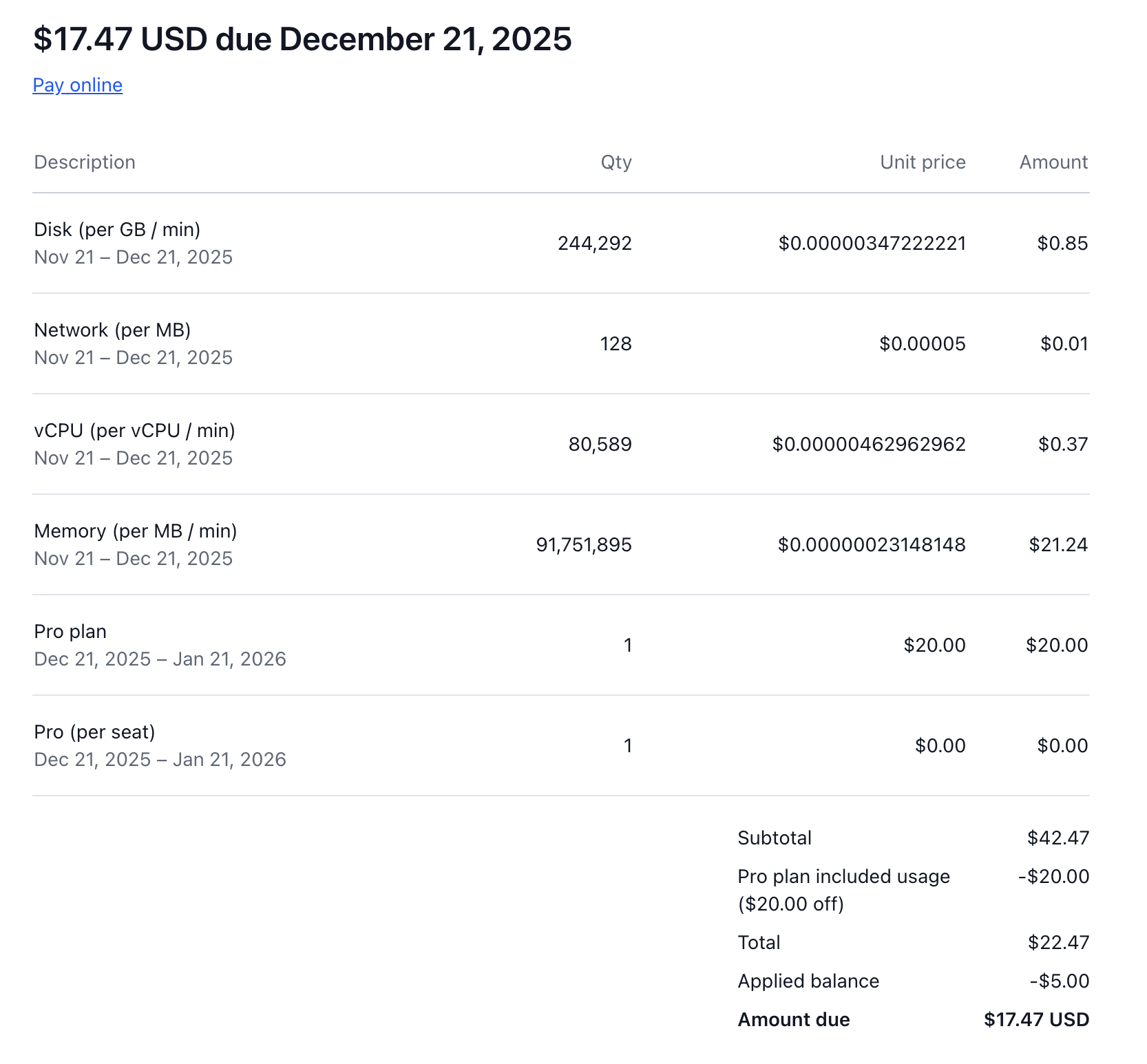
Railway bills the next subscription period in advance and eligible usage overages from the previous period afterward. For example, $46.50 in eligible Pro usage for one cycle means $20 covered by the plan and $26.50 in overage. A later invoice may show that $26.50 together with a new $20 subscription charge; it is not double billing for the same period.
| Hobby usage during one billing cycle | Base subscription | Additional usage charge | Total before tax |
|---|---|---|---|
| $3 | $5 | $0 | $5 |
| $5 | $5 | $0 | $5 |
| $8 | $5 | $3 | $8 |
| $15 | $5 | $10 | $15 |
Unused standard monthly usage does not roll over. For example, spending $3 of Hobby’s $5 allowance does not create an extra $2 credit for the following cycle.
Railway Agent, the platform’s AI assistant, has model-based usage charges. Agent costs appear as a separate invoice line but draw from the same included monthly allowance as eligible infrastructure usage. Compute and Agent have separate usage controls, so monitor both when using the assistant regularly.
Railway explains this timing in Understanding Your Bill.
How Much Does Railway Charge for CPU, RAM, Bandwidth, and Storage?
Railway measures compute, memory, outgoing network traffic, and durable storage separately. CPU and RAM charges depend on how much a service consumes over time. Egress depends on outbound data volume, while volumes and buckets have different storage rates. A single application can generate several types of charges simultaneously.
| Resource | Published rate | What drives the charge |
|---|---|---|
| CPU | $20 per vCPU-month equivalent | Average processing usage over time |
| RAM | $10 per GB-month equivalent | Memory consumed by running services |
| Service network egress | $0.05 per GB | Outbound data from services |
| Persistent volume storage | $0.15 per GB-month | Durable storage attached to services |
| Object storage buckets | $0.015 per GB-month | Files and objects held in buckets |
| Sandbox or VM CPU | $50 per vCPU-month equivalent | CPU consumption by VM workloads |
| Sandbox or VM RAM | $50 per GB-month equivalent | Memory held by VM workloads |
The monthly CPU and RAM rates represent sustained consumption for the equivalent billing month. Railway meters actual use over time, so briefly consuming one vCPU costs less than keeping one vCPU fully utilized for an entire month.
Railway meters CPU consumption over time and charges for memory held by a running service. Even with few requests, an active container may continue generating RAM charges.
How Do Persistent Volumes and Storage Buckets Differ in Price?
Persistent volumes store durable application data attached to a running service, including database files. Railway charges $0.15 per GB-month for volume storage. Buckets hold objects such as uploaded photos or documents at $0.015 per GB-month. Their lower price does not make them interchangeable with a mounted database volume.
Railway bucket egress and supported S3 API operations are free. However, a Railway service that uploads files to a bucket can incur service egress because the bucket uses the public network. Direct bucket links may avoid that service-side transfer. See Railway’s bucket billing rules.
Railway’s VM and sandbox workloads use higher CPU and RAM rates than standard containers. A VM can continue accruing memory charges while waiting for work, so do not use the container rates to estimate those workloads.
Is Railway Free to Use After the Trial Ends?
Yes. Railway offers a permanent Free plan with $1 of monthly usage credit after its introductory trial. New users normally start with a separate $5 trial credit valid for up to 30 days. Both options have restrictions, and the Free plan is meant for lightweight projects rather than unrestricted production hosting.
What Does Railway’s Free Plan Include?
The Free plan costs $0 per month and provides $1 of resource credit that resets monthly. Its standard per-service limits include up to one vCPU, 0.5 GB of RAM, one replica, and 0.5 GB of volume storage. These limits are considerably smaller than Hobby’s and can restrict otherwise functional applications.
A lightweight service may stay within Free’s $1 monthly credit, but a continuously running web service plus database may exhaust it quickly. Once the allowance runs out, the account is subject to Free-plan restrictions. Check your workspace status before relying on it for an essential application.
How Is the Railway Trial Different From the Free Plan?
The new-account trial provides a one-time $5 allowance for up to 30 days, whereas the Free plan provides $1 that renews monthly. Full Trial and Limited Trial accounts can deploy code and databases, but the Limited Trial restricts outbound network access and available ports. Verification can depend on your connected GitHub account.
Trial resources may have higher temporary limits than the ongoing Free tier. Railway states that the trial reverts to Free after 30 days or when the one-time $5 grant runs out, whichever happens first. Review deployments that may exceed Free limits.
Railway may delete trial volumes after its documented retention window, so preserve important data before the trial ends. The official Free Trial guide describes eligibility, verification, and retention.
How Much Does Hosting an Application on Railway Actually Cost?
Real Railway hosting costs depend on average resource consumption, not merely application count or visitor traffic. The following estimates use published resource rates and explicitly hypothetical workloads. They illustrate calculations, not measured customer averages or guaranteed bills.
Each example assumes the listed RAM and CPU figures are combined averages across all services in that scenario over a representative 30-day-equivalent month. The estimates exclude taxes, optional backups, promotional credits, and unrelated software subscriptions. Actual usage and billing period length may vary.
| Monthly usage assumption | Small hobby app | n8n with PostgreSQL | Small SaaS application |
|---|---|---|---|
| Average RAM consumption | 0.25 GB | 1.5 GB | 3 GB |
| Average CPU consumption | 0.02 vCPU | 0.15 vCPU | 0.5 vCPU |
| Network egress | 2 GB | 10 GB | 100 GB |
| Persistent volume storage | 0 GB | 2 GB | 10 GB |
| RAM charge | $2.50 | $15.00 | $30.00 |
| CPU charge | $0.40 | $3.00 | $10.00 |
| Egress charge | $0.10 | $0.50 | $5.00 |
| Storage charge | $0.00 | $0.30 | $1.50 |
| Total resource usage | $3.00 | $18.80 | $46.50 |
| Assumed plan | Hobby | Hobby | Pro |
| Estimated bill | $5.00 | $18.80 | $46.50 |
What Does a Small Hobby App Cost on Railway?
A low-traffic app that averages 0.25 GB of memory and 0.02 vCPU for a full month produces around $2.90 in compute charges. Add 2 GB of outgoing traffic, and resource usage reaches $3.00. On Hobby, the $5 subscription minimum already covers that amount, so the estimated bill remains $5.
This type of budget fits a small API, prototype, personal dashboard, or lightweight service with modest demand. It assumes no separately running database. Extra replicas, storage, or a more memory-intensive runtime would change the result.
How Much Does Self-Hosted n8n Cost on Railway?
A self-hosted n8n deployment can hold memory continuously even between workflow runs. Suppose n8n and its PostgreSQL service jointly average 1.5 GB RAM and 0.15 vCPU, use 10 GB of outbound traffic, and store 2 GB on a volume. The resulting estimate is $18.80 in resources for the month.
Under Hobby, that usage exceeds the $5 included allowance, so the estimated total is $18.80. Busier executions, additional workers, retained workflow data, and more database activity can raise the amount. This is a modeled scenario, not a claimed standard n8n bill.
Hosted n8n Cloud uses a different pricing model from self-hosting on Railway. Developers can compare n8n pricing to estimate managed subscriptions against infrastructure and maintenance. Primingo also lists n8n Cloud access as a separate purchase option. Check activation, execution allowances, and renewal terms before comparing costs.
How Much Does a Small SaaS Application Cost on Railway?
A small SaaS application may run a web server, background worker, and database at the same time. If they jointly average 3 GB of RAM and 0.5 vCPU, send 100 GB of outbound data, and store 10 GB on a volume, the modeled resource bill is $46.50 per month.
On Pro, the first $20 is included in the workspace subscription, making $46.50 the estimated combined total. A second production replica, staging environment, or traffic surge would add further consumption. Growth does not cause a single fixed jump in price because Railway meters the workload’s actual resource demand.
A team might build the application in Replit before deploying it to Railway. In that case, development and publishing expenses belong in a separate budget. The guide to Replit pricing helps distinguish development-platform costs from Railway’s hosting charges.
How Much Does PostgreSQL Hosting Cost on Railway?
Railway PostgreSQL has no universal fixed database subscription price. A running PostgreSQL service uses billable CPU and RAM like other services, while its persistent volume adds storage costs and applicable network traffic may also be charged. Memory can remain billable even while the database waits for queries.
For instance, a hypothetical PostgreSQL service averaging 0.5 GB RAM and 0.05 vCPU throughout the month would consume $5 in memory and $1 in CPU. A 5 GB persistent volume adds $0.75, producing $6.75 before network traffic and other services.
This assumes sustained averages, not typical Postgres usage for every application. Query load, connection pools, caching, extensions, and storage growth affect actual charges. Developers comparing Railway’s self-managed database deployment with a broader managed backend can also review Supabase pricing, but the included services and responsibilities differ.
When your application and database run within Railway, prefer the supported private network connection. The internal DATABASE_URL can avoid public TCP-proxy egress associated with DATABASE_PUBLIC_URL.
Backups and point-in-time recovery may use extra resources or storage. Confirm your chosen backup system’s costs and retention rather than assuming they’re covered by the database’s memory charges. Railway’s PostgreSQL documentation explains its deployment model.
Why Is Your Railway Bill Higher Than Expected?
Railway bills can increase when active services consume memory, CPU usage rises, additional replicas or preview environments remain deployed, or outbound traffic grows. Open the workspace Usage page and compare spending by project and resource type to find the cause.
| Unexpected increase | Possible explanation | First place to investigate |
|---|---|---|
| Memory costs | Long-running services or a memory leak | Service memory graph |
| CPU costs | Heavy requests, background work, or inefficient code | CPU usage metrics |
| Network egress | Large responses or public database connections | Network usage and routing |
| Duplicate compute | Staging, PR deployments, or extra replicas | Active services and environments |
| Database expenses | Persistent memory, processing, or volume growth | Database and volume metrics |
| Railway Agent charges | More AI assistant token usage | Separate Agent usage breakdown |
An idle service may still incur memory charges while running. Check whether the service is actively deployed or has actually gone to sleep through a supported serverless configuration.
Preview environments can be another surprise. When a pull request triggers a mirrored environment, Railway runs additional copies of selected workloads. Those copies generate their own compute costs until they are removed.
Railway’s standard service builds are free. Build usage should not be mistaken for charges generated by the deployed service itself. See the official resource pricing and build policy.
How Can You Check Your Railway Usage and Billing Details?
Open your Railway workspace Usage page to inspect accumulated consumption and estimated costs by project. Compare that breakdown with current deployments before changing settings. Invoices and billing history are separate from the in-progress estimate, and an invoice can include a coming month’s plan fee alongside last month’s overage.
- Sign in to Railway and select the relevant workspace.
- Open the Usage section in workspace settings.
- Check the current billing period and estimated bill.
- Review CPU, RAM, network, volume, and Agent usage where applicable.
- Open the project breakdown to identify the services contributing the most cost.
- Compare the numbers with the previous billing period and investigate any unusual increase.
- Open Billing History to review issued invoices and payments.
Railway recommends allowing a new deployment to run for around a week before relying on its estimated usage for budgeting. A short test run may not capture weekly jobs, heavier traffic days, or periodic maintenance work.
For terminal-based checks, railway usage shows workspace usage and railway usage projects provides project-level costs. Both appear in the Railway usage CLI guide.
How Can You Reduce Railway Hosting Costs?
Open the workspace Usage page and identify the service responsible for your largest resource charge. Then examine baseline memory, unnecessary replicas, avoidable egress, or idle services that may benefit from sleeping. Railway’s alerts, hard limits, private networking, and serverless controls address different cost problems.
How Do Railway Usage Alerts and Hard Limits Work?
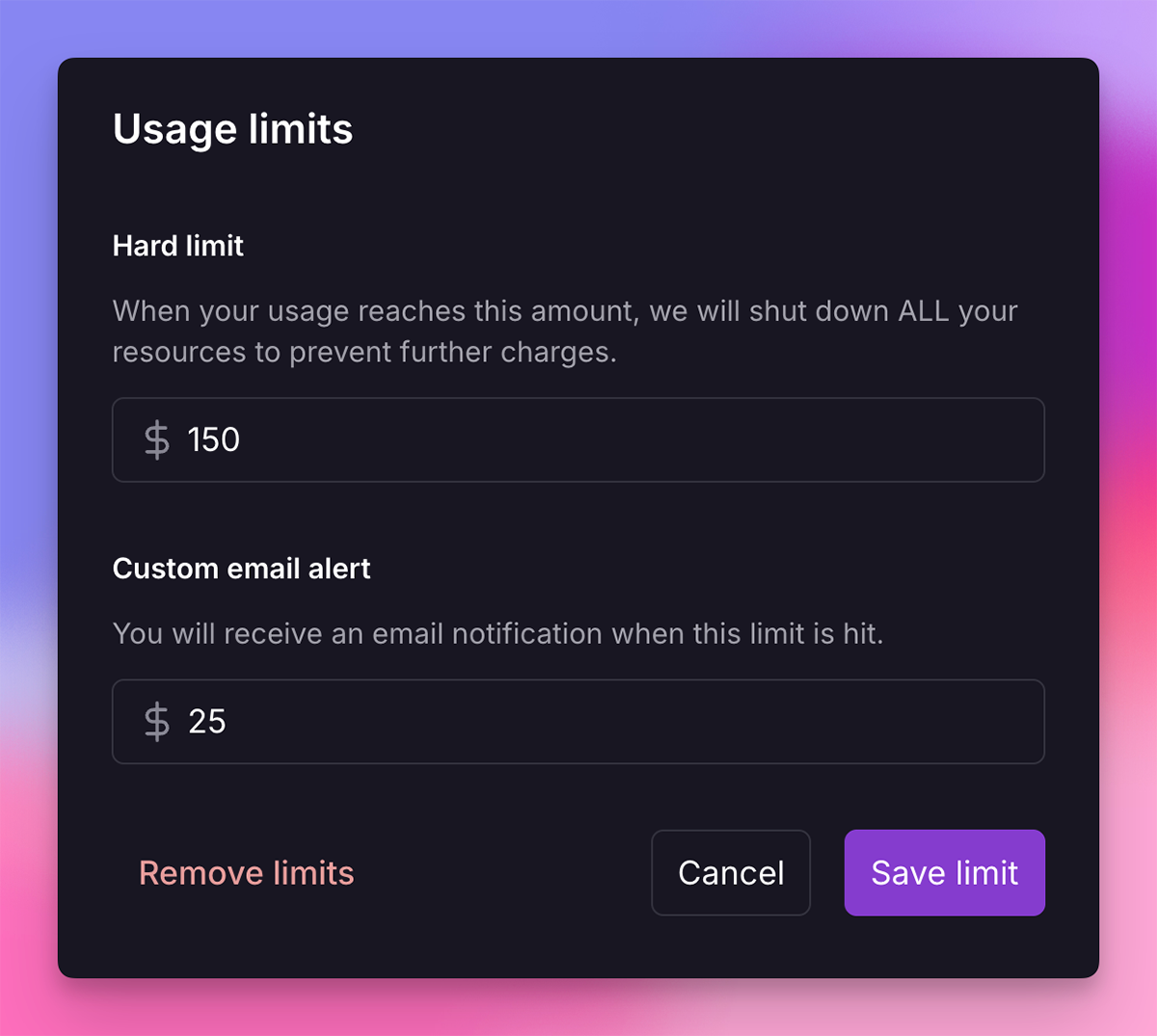
A usage alert emails you when the selected threshold is reached but does not stop spending. A compute hard limit shuts workloads down once exceeded, which can take a production application offline. Agent hard limits operate separately and do not themselves shut down application services.
The Railway CLI supports workspace compute hard limits from $10 upward. The dashboard offers separate compute and Agent settings. Set thresholds with appropriate headroom for normal workloads, and consult Railway’s cost-control documentation before enabling a service-stopping limit.
Can Railway Serverless Reduce Costs for Idle Applications?
Railway Serverless can stop an eligible inactive service and reduce the compute charges it accumulates while asleep. The platform detects inactivity through outbound network activity, not just visitor counts. Database connections, telemetry, or periodic API requests may keep a service awake despite an apparently empty traffic dashboard.
You can find the toggle in the service’s Deploy settings. A new deployment may be needed for the setting to apply to an already running container. Sleeping can delay the first response after inactivity, so check whether cold starts are acceptable for your application.
Serverless generally suits occasional websites and internal tools better than always-on background workers. Review Railway’s Serverless guidance before enabling it on a service that needs uninterrupted responsiveness.
What Other Changes Lower Railway Resource Costs?
Reduce memory waste first when usage graphs show a large idle baseline. Fix leaks, close unnecessary processes, and choose appropriate runtime settings. Remove unused staging services and temporary environments. Keep application-to-database traffic on supported private networking, and review large outgoing files that may generate service egress.
Per-replica CPU and memory limits cap the resources available to an individual replica. Set them too low and a workload may fail; set them too high and you may permit unnecessary consumption. Measure actual utilization before changing them.
Costs for external coding assistants or development software are separate from Railway infrastructure. Record these as software subscriptions, not as Railway deployment charges, to keep your project budget accurate.
Which Railway Pricing Plan Should You Choose in 2026?
Choose Free for small experiments within its resource limits, Hobby for individual projects or small production services that fit Hobby’s features, and Pro when you need higher limits or collaboration capabilities. Enterprise is appropriate when contractual support, compliance, or advanced infrastructure requirements justify it. Revenue generation alone does not require Pro.
| Your situation | Plan to evaluate first | Reason |
|---|---|---|
| Small experiment with limited resources | Free | No subscription fee and small recurring credit |
| Personal API, portfolio backend, or side project | Hobby | Lower minimum spend with metered resources |
| Production application requiring Pro-only limits or team features | Pro | Higher capacity, collaboration, and support options |
| Advanced compliance and large-scale infrastructure | Enterprise | Custom commitments and capabilities |
A Hobby application may exceed its $5 included usage and still cost less than Pro. Upgrade when you need Pro’s limits or capabilities,not simply because the Hobby bill exceeds $5.
Railway Hobby costs a minimum of $5 per month directly, equivalent to $60 over 12 months before additional usage and taxes. Primingo separately lists a Railway Hobby redeem code for $120 for one year. This third-party offer costs more than Railway’s direct annual minimum. Compare eligibility, activation, usage overages, renewals, and support before deciding.
Primingo currently lists the following Railway purchase option:
| Primingo plan | Duration | Price |
|---|---|---|
| Hobby Redeem Code | 1 Year | $120 |
Before choosing, add up web services, workers, databases, and storage. A SaaS product might also need an external service for login emails or payment receipts. Resend pricing illustrates another cost that does not belong in a Railway hosting estimate. For broader subscription planning, Primingo lists digital-tool offers, but verify Railway’s direct plans and usage costs with Railway itself.
Frequently Asked Questions About Railway Pricing
Is Railway Hobby $5 Plus Usage?
No. Hobby has a $5 monthly minimum that covers the first $5 of eligible usage. If your resources consume $8 in a billing cycle, that cycle normally costs $8 before tax and other adjustments, not $13.
Does Railway Charge for an Idle App?
Yes. A running Railway service can generate memory charges even when it receives no visitor traffic. CPU, storage, and network costs depend on actual consumption. Eligible services can reduce compute costs by sleeping when inactive through Railway Serverless.
Can Railway Automatically Stop Spending at a Set Limit?
Yes. Railway supports a compute hard limit that takes workloads offline once the configured threshold is reached. A usage alert sends an email but does not stop spending. The Agent hard limit is separate from the infrastructure hard limit.
Do Unused Railway Monthly Credits Roll Over?
No. Hobby’s $5 and Pro’s $20 of standard included monthly usage reset each billing cycle. Unused allowances do not carry forward. Separate trial or promotional credits can have different expiration terms.
Does Railway Pro Charge Per Developer?
No. Railway Pro charges $20 per workspace per month and includes unlimited workspace seats. Adding a developer does not create another $20 seat fee, but additional deployments and infrastructure consumption can increase the total bill.
