

Is Notion AI Free in 2026?
Yes, Notion AI is free to try in 2026, but its full features are not permanently free for everyone. Notion Free and Plus workspaces receive limited complimentary AI responses. Continued access to core AI features generally requires Business or Enterprise, although eligible users can temporarily access Business through official trials and promotional programs.
Notion AI is integrated into the Notion workspace. It helps users generate content, summarize documents, answer questions, organize information, and work with databases. Feature availability depends on the workspace plan and applicable usage restrictions.
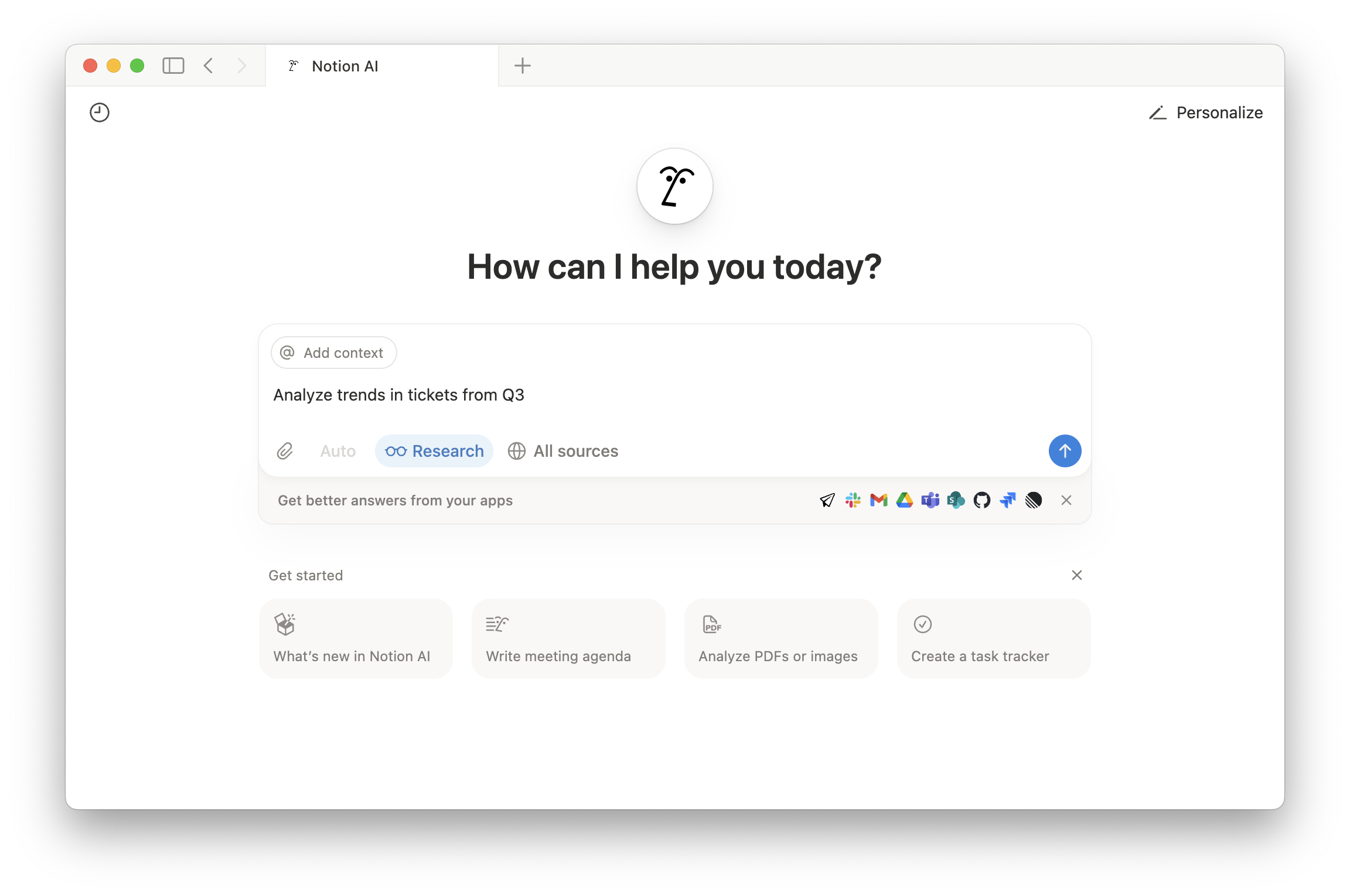
Once complimentary responses run out, the regular workspace remains available, but continued full AI use generally requires Business, Enterprise, or another eligible offer. Notion does not promise that free trial responses refill each month.
Free Notion AI Options at a Glance
The following table compares the legitimate methods available in 2026.
For most individuals, complimentary responses are the easiest starting point. Businesses and startups should check the available Business offers, while students can evaluate the Education and GitHub benefits.
Which Free Notion AI Method Fits Your Situation?
| Your Situation | Best Starting Point | What to Expect |
|---|---|---|
| Individual testing Notion AI | Complimentary responses on Free | Limited AI actions with no paid subscription required |
| Eligible professional team | 30-day Business trial | Test core AI and workspace features; review renewal terms |
| Qualifying startup | Notion for Startups | Apply for 1, 3, or 6 months based on eligibility |
| University student or educator | Education plan | Free enhanced workspace; AI testing remains limited |
| Verified GitHub student | Education plan plus GitHub benefit | Additional limited AI responses, not permanent unlimited AI |
How to Get Notion AI for Free in 2026
There are several legitimate ways to access Notion AI without an initial subscription payment. The simplest is using complimentary responses on a free workspace. Eligible teams can try Business for 30 days, qualifying startups may receive extended Business access, and verified students can claim additional AI responses through GitHub Education.
The following methods explain what you receive, how to activate each benefit, and which restrictions you should understand before signing up.
Method 1: Activate Complimentary Notion AI Responses
Anyone can start by creating a free Notion workspace and using the complimentary AI responses provided for testing. You do not need to purchase Business just to try Notion AI.
However, Notion does not publicly guarantee a fixed number of complimentary responses for every workspace. These responses are intended for initial testing rather than unlimited ongoing use.
Follow these steps to activate your free access:
- Open the official Notion website.
- Select the option to create a free account.
- Register with your email address or an available sign-in method.
- Complete the workspace setup.
- Open a page or the available Notion AI interface.
- Enter a prompt and submit your first AI request.
For example, create a page containing meeting notes and ask Notion AI to summarize the main decisions. This allows you to test whether its writing and summarization capabilities fit your workflow before considering an upgrade.
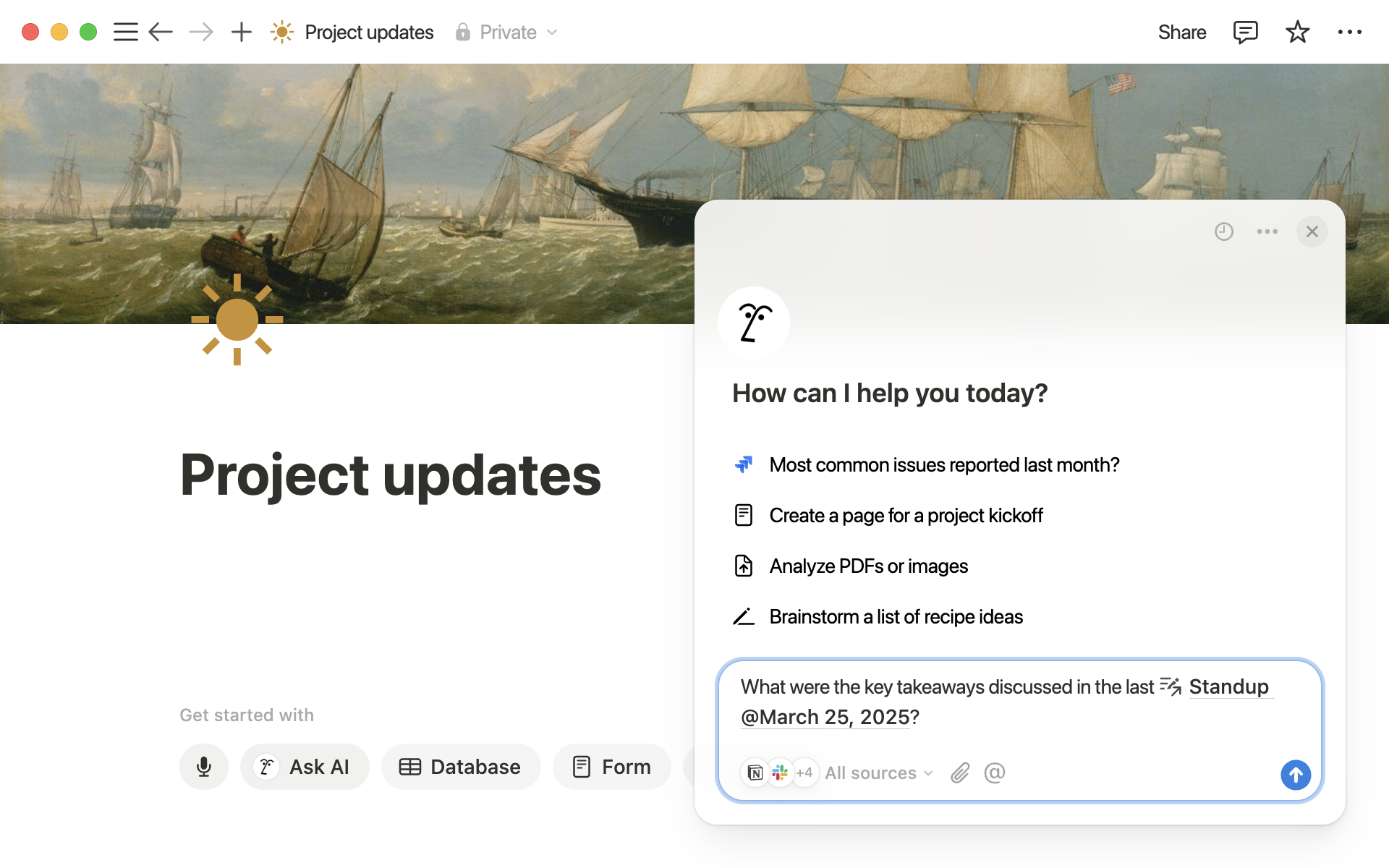
Other useful trial tasks include rewriting paragraphs, creating outlines, translating short passages, and organizing existing notes.
Each completed AI action can consume a complimentary response. Repeating a task using the Try again option also consumes another response.
Notion does not advertise these complimentary responses as a recurring monthly allowance. Once they are exhausted, you generally need Business, Enterprise, or another eligible benefit to continue using the full AI features.
Best for: Beginners, individual users, and anyone who wants to test Notion AI without paying.
Method 2: Get the 30-Day Notion Business Trial
Eligible teams can access the Notion Business plan free for 30 days, including its integrated AI capabilities. This offer is intended for teams using a professional email domain. Personal and educational email domains do not qualify.
The Business trial gives eligible workspaces access to features such as Notion AI, AI Meeting Notes, Research Mode, and supported AI connectors.
Before activating the offer, review the following conditions:
- Duration: 30 days.
- Eligibility: Teams using an eligible professional email domain.
- Payment information: Some trials can begin without payment details.
- Automatic renewal: Trials started with payment information automatically continue as paid Business subscriptions unless canceled.
To activate the trial:
- Prepare a professional email address associated with your organization.
- Create or sign in to an eligible Notion workspace.
- Open Notion through a web browser or desktop application.
- Navigate to Settings and the available plan options.
- Find the Business trial offer if your workspace qualifies.
- Review the payment and renewal conditions before starting.
- Activate the trial and begin testing Notion AI.
Not every existing workspace will display the trial option. Teams already using Business or Enterprise are not eligible for this introductory offer.
Billing warning: Some eligible Business trials can begin without payment information. Others require it; a trial started with payment details can renew automatically unless canceled. Review the renewal conditions shown during activation.
A practical way to evaluate the trial is to use the same real tasks your team performs every week. For example, test document summaries, workspace search, and AI Meeting Notes before deciding whether Business is necessary.
Some teams only need AI meeting summaries rather than an entire Business workspace. Test AI Meeting Notes during an eligible trial and compare its usefulness with your existing meeting workflow.
Best for: Eligible businesses, professional teams, and users who need to evaluate Notion AI for daily work.
Method 3: Apply for Notion for Startups
Eligible startups can receive one to six months of Notion Business without paying the usual subscription fee. The program includes Notion AI and requires applicants to meet Notion’s eligibility conditions.
The available duration depends on startup verification, company type, and whether the applicant belongs to a participating partner organization.
Notion describes three promotional categories:
- Partner-affiliated startups: Eligible applicants may receive six months of Business.
- Non-partner startups: Qualifying applicants may receive three months.
- Smaller businesses and service-based teams: Eligible applicants may receive one month.
For longer startup offers, Notion generally requires a public company website, a professional company email address, fewer than 100 employees, and a new customer account that is not currently on a paid plan.
The three-month and six-month offers are primarily intended for verified startups developing scalable technology-related products or services. Smaller businesses, agencies, consultancies, and service-based companies may instead qualify for the one-month offer.
To apply:
- Open the official Notion for Startups program.
- Review the eligibility requirements and available offers.
- Prepare your company website and professional email address.
- Choose the appropriate application route.
- Enter your company details and workspace information.
- Include a valid partner code if your startup qualifies through a partner.
- Submit the application for review.
If Notion approves the application, it confirms the offer by email and applies the Business plan to the selected workspace.
Approval is not automatic. Incomplete company information, an inactive website, or an inability to verify startup status can affect eligibility or promotional duration.
Best for: Eligible founders, technology startups, and small businesses that want extended Notion AI access before committing to a subscription.
Method 4: Get the Free Notion Education Plan
Eligible university students and educators can receive Notion’s Education plan for free. The plan includes enhanced workspace benefits based on Notion Plus, but it does not automatically provide unlimited or ongoing full Notion AI access.
Students can still use their available complimentary AI responses under the applicable workspace rules.
To qualify, individual applicants generally need an email address from an accredited college or university recognized by Notion. The education email must be the primary address on the Notion account.
Follow these steps:
- Sign in to Notion using your university or college email address.
- Make sure your workspace is on the Free plan.
- Check that your individual workspace has only one member.
- Open Notion on the web or desktop.
- Go to Settings and select Upgrade plan.
- Choose Get free education plan.
- Complete the eligibility verification if prompted.
Students must verify their education status annually to retain the individual Education plan. Notion does not accept a student ID or enrollment letter as a replacement for the required school email verification.
If the school email is no longer valid and eligibility cannot be renewed, the workspace returns to the Free plan. Its content remains in the workspace, but Education-only features may become unavailable.
The standard individual Education offer is intended for eligible higher education students and teachers. Primary and secondary school students do not qualify for that specific program. Verified student organizations have a separate, application-based Education plan that can support multiple members; it does not itself promise unlimited Notion AI.
Read Notion’s Education plan eligibility requirements before applying.
Best for: University students and educators who want enhanced Notion workspace features and access to applicable limited AI testing.
Extra Notion AI Responses Through GitHub Student Developer Pack
Verified students can claim additional Notion AI responses through the GitHub Student Developer Pack. GitHub lists a Notion benefit that combines Education plan features with extra AI responses.
This additional student benefit does not provide unlimited AI usage or upgrade the workspace to a permanent Notion Business subscription.
Students must first qualify for GitHub Education. Its verification requirements differ from Notion’s standard higher education eligibility rules.
To claim the benefit:
- Open the GitHub Student Developer Pack.
- Sign in with your personal GitHub account.
- Apply for student verification if you have not completed it.
- Wait for GitHub to confirm your eligibility.
- Find the Notion offer within the available student benefits.
- Follow the official redemption instructions.
- Connect the appropriate Notion account when requested.
After redemption, review your Notion workspace to confirm which benefits have been applied.
GitHub does not advertise this offer as unlimited Notion AI access. Check the current redemption conditions and any additional response allowance when claiming the benefit.
Students comparing other legitimate learning benefits can also review ChatGPT student discounts and free AI options to understand how temporary promotions differ from standard free access.
Best for: Verified students who have access to GitHub Education and want additional Notion AI trial usage.
Historical offer note: Notion previously advertised creator promotions, but an active 2026 application route was not verified. Do not treat past creator eligibility thresholds as a currently available free-access method.
Notion AI Free Limits and Usage Rules
Free Notion AI access has usage restrictions that depend on the offer. Complimentary AI responses are limited and do not have an advertised monthly refill, while promotional Business access lasts only for the approved period.
Business and Enterprise also apply usage allowances to certain AI features. Temporary free access should therefore not be confused with unrestricted, permanent AI usage.
How Many Complimentary Notion AI Responses Are Available?
Notion does not publish a guaranteed fixed number of complimentary AI responses for every Free or Plus workspace. Instead, users receive a limited allowance to test supported AI actions.
When the allowance is exhausted, Notion displays an upgrade requirement for continued full AI access.
Actions that consume complimentary responses include:
- Generating new content.
- Rewriting or editing existing text.
- Summarizing information.
- Asking questions using Notion AI.
- Using AI blocks or supported database autofill actions.
- Regenerating a response using Try again.
Plan your trial around a few realistic tasks rather than repeatedly generating similar outputs. This helps you evaluate the features that matter most before the allowance runs out.
Do Complimentary Notion AI Responses Renew Monthly?
Notion does not advertise a recurring monthly refill for the complimentary AI responses available on Free and Plus.
Users should treat these responses as a limited trial rather than a monthly allowance. The six-hour and monthly usage refresh windows documented for certain Business and Enterprise features are separate.
Upgrading from Free to Plus does not restore an exhausted complimentary AI allowance. Notion’s plan management documentation explains how AI trial access differs from paid workspace features.
What AI Limits Apply During a Notion Business Trial?
Notion Business provides ongoing access to core Notion AI features, but some capabilities have usage limits. Notion measures certain AI activities through six-hour and monthly usage windows.
Premium AI models and selected agent features may require separate Notion credits, depending on workspace settings.
For example, Notion applies usage allowances to certain personal Agent activities, image generation, and page translation. AI Meeting Notes follows a separate daily allowance.
These restrictions also matter during a free Business trial because promotional access does not remove the standard plan’s applicable limits.
The main limits can be separated as follows:
| Access Type | Usage Restriction | What It Means |
|---|---|---|
| Complimentary Free or Plus AI | Limited trial responses | No advertised recurring monthly refill |
| Business trial | Temporary plan access | Available for the approved trial period |
| Business core AI features | Feature-specific usage allowances | Some capabilities refresh after defined intervals |
| Premium models and selected AI agents | Notion credit requirements | Additional usage may involve separate charges |
A free Business trial allows teams to evaluate advanced AI features, but continued access may involve a paid workspace subscription and additional usage-based costs.
Before upgrading, review Notion AI pricing and usage credits to compare workspace charges, included AI allowances, and separate credit costs.
What Happens When Free Notion AI Access Ends?
When complimentary AI responses run out, your free workspace remains available, but continued full AI usage generally requires an eligible upgrade or offer.
A Business trial follows different rules. If you entered payment details, it can renew automatically as a paid subscription unless canceled. If you started without payment details, you generally need to confirm an upgrade to become a paying customer.
The outcome also depends on which free-access method you used.
| Free Access Type | What Happens After It Ends? |
|---|---|
| Complimentary AI responses | AI trial access ends; regular workspace features remain |
| Business trial without payment details | Paid upgrade requires confirmation |
| Business trial with payment details | Business subscription can renew automatically |
| Startup promotion | Continued access depends on the offer’s expiration and resulting plan |
| Education plan | Remains available while the user maintains eligibility |
| GitHub student AI benefit | Additional promotional responses eventually expire or are exhausted |
Will a Notion Business Trial Renew Automatically?
Notion’s complimentary AI response trial does not itself create a paid Business subscription.
For the 30-day Business trial, automatic renewal depends on how the trial was started. If you entered payment information to activate it, Notion says the Business subscription renews at the end unless you cancel.
If no payment details were provided, the user must confirm the upgrade before continuing with a paid Business subscription.
Before starting a Business trial, check whether your payment method is attached and whether automatic renewal is enabled.
Review the billing information displayed during activation. Do not assume that every free trial has the same renewal conditions.
How Do You Cancel the Notion Business Free Trial?
You can cancel an active Business trial through Notion’s workspace settings. Canceling prevents the trial from continuing as a paid Business subscription under the applicable conditions.
Most canceled trials return to the Free plan when the trial period ends, although trials started from Plus follow different downgrade behavior.
Follow these steps:
- Open Notion through its web or desktop application.
- Select Settings from the sidebar.
- Navigate to Explore plans.
- Find the active Business trial.
- Select the available cancellation option.
- Review the confirmation and resulting plan changes.
After cancellation, Business-only features may become unavailable according to the workspace’s resulting plan.
Notion states that trials started from Plus return to Plus immediately when canceled. For other eligible workspaces, cancellation generally results in the Free plan at the end of the trial.
What Happens to Your Workspace and Data After the Trial?
When a Business trial ends, your workspace changes according to the resulting subscription plan. Existing content generally remains in the workspace, but features reserved for Business may become unavailable.
For example, a workspace returning to Free may lose access to Business-specific collaboration, administration, and AI capabilities.
Before the trial expires, review any workflows that depend on advanced AI features, connected services, or Business-only settings.
Keep important documents organized and confirm that the resulting workspace plan supports your ongoing requirements.
Why Is Your Notion AI Free Trial Not Available?
A Notion AI trial or promotional offer may be unavailable because your workspace does not meet the eligibility requirements, the introductory benefit has already been used, or account information needs verification.
Business trials require qualifying professional domains, Education plans require recognized school email addresses, and startup promotions require application approval.
| Problem | Possible Cause | Recommended Action |
|---|---|---|
| Business trial missing | Ineligible domain or existing Business plan | Review trial eligibility and professional domain requirements |
| AI asks for an upgrade | Complimentary responses exhausted | Check workspace plan and remaining eligibility |
| Education offer missing | School email not recognized as the primary address | Verify the primary email and education eligibility |
| Student upgrade blocked | Multiple members or previously claimed offer | Review workspace membership and redemption history |
| Startup application rejected | Insufficient business verification or ineligible applicant | Review official program criteria and supporting business details |
| Education offer already claimed | The school email or workspace previously used the offer | Check redemption history; the same offer cannot simply be claimed again on a new workspace |
For students, Notion provides a dedicated Education plan troubleshooting guide covering email verification, workspace membership, and previously redeemed offers.
If your workspace meets the stated requirements but the offer remains unavailable, use Notion’s official support channel instead of repeatedly creating accounts to bypass promotional restrictions.
Free Notion AI vs Paid Business: When to Upgrade
If you have exhausted free Notion AI access and do not qualify for another official offer, first decide whether you need AI integrated directly into your existing workspace.
Business is the main option for ongoing core Notion AI features. However, separate AI assistants may be sufficient for writing, research, or document summarization.
Compare the tools you actually use before purchasing a paid subscription.
Notion Plus vs Business AI Access
Suppose your team has used its complimentary AI responses but still relies on Notion to manage documents, projects, and internal knowledge.
Upgrading to Plus may improve collaboration and workspace features, but it does not automatically provide continued full AI access.
Compare the Notion Business vs Plus AI features before upgrading, especially when your team needs ongoing AI rather than only stronger workspace collaboration.
Business generally makes more sense when AI-generated summaries, connected workspace research, and meeting notes form part of everyday operations.
Plus may remain sufficient when your main requirements involve documents, databases, and collaboration rather than ongoing AI usage.
Alternatives to Notion AI for Writing and Research
If you primarily use Notion AI to draft content, summarize information, or research unfamiliar topics, you may not need every Business workspace feature.
Someone who writes in Notion but needs AI only occasionally could use a standalone assistant and move the finished content into a Notion page.
Our Notion AI vs ChatGPT for writing and research comparison explains when an integrated workspace is more useful than a standalone AI assistant.
A separate assistant does not unlock Notion AI features inside your existing workspace. Readers considering a paid standalone account can compare ChatGPT subscription options on Primingo, while checking access type, account ownership, and privacy requirements.
Are Paid Notion AI Marketplace Options Worth Considering?
Users who need ongoing Notion AI access can compare official Business subscriptions with independently sold account products. These options may differ in account ownership, workspace control, privacy, duration, and support.
For example, someone with an existing Notion workspace may prefer to investigate an offer applied to their own email instead of receiving access to a separate account.
If you are comparing third-party purchase routes, review Notion AI subscription options on Primingo and check the selected account type and activation method.
These are paid marketplace products, not official free Notion offers. Confirm the selected account type, delivery method, workspace ownership, renewal terms, and privacy conditions before purchasing.
Independent marketplace subscriptions are paid products and should not be confused with free trials or promotions provided directly by Notion.
The most suitable paid option depends on whether you require full control of your current workspace, ongoing integration, or access through a separately managed account.
For most users, complimentary responses are the easiest starting point. Eligible teams should evaluate the 30-day Business trial, qualified startups can apply for longer promotional access, and students can check Education and GitHub benefits. Choose based on eligibility and renewal terms rather than the longest advertised offer.
Frequently Asked Questions About Free Notion AI
Can You Use Notion AI for Free Forever?
No. Notion Free and Plus workspaces provide limited complimentary AI responses, not permanently unrestricted AI use. Continued core AI access generally requires Business, Enterprise, or an eligible temporary offer.
How Many Free Notion AI Responses Do You Get?
Notion does not publish one fixed complimentary-response count guaranteed for every Free or Plus workspace. Responses are intended for testing, and each completed AI action or regeneration may count toward the allowance.
Can You Get the 30-Day Notion Business Trial With Gmail?
No. The 30-day Business trial is limited to eligible teams using professional email domains. Personal Gmail and education domains do not meet this requirement; those users can still try complimentary AI responses on a Free workspace.
Is Notion AI Free for University Students in 2026?
Eligible university students and educators can claim a free Education workspace, but that does not include permanently unrestricted Notion AI. Verified students may obtain additional limited AI responses through the GitHub Student Developer Pack.
Can You Try Notion AI Without a Credit Card?
Yes. Free workspace users can try complimentary Notion AI responses without buying Business. Some eligible Business trials also start without payment information; check the terms displayed during activation.
Will Notion Automatically Charge You After a Business Trial?
It depends on how the trial started. A Business trial activated with payment information can renew as a paid subscription unless canceled. Without payment details, a paid upgrade generally requires confirmation.
What Happens After Complimentary Notion AI Responses Run Out?
Your regular Notion workspace remains accessible, but continued full AI use generally requires an eligible Business or Enterprise plan or another qualifying promotion. Upgrading only to Plus does not automatically replenish the trial allowance.
Can Existing Paid Notion Customers Claim the Startup Offer?
Notion for Startups targets qualifying new, non-paying customers. Existing paid or previously promotional workspaces may be ineligible. Review the current application conditions before relying on a one-, three-, or six-month benefit.
